
Step 1 – Choose How You Will Play
You have two realistic options. Open the lobby in your phone browser and play immediately with nothing installed, or download the Android package so the 2fun bet game opens from your home screen. Browser first is the lower-commitment choice; install later if you find yourself returning.
On a computer, the browser is the only sensible route. There is no desktop program, and the same lobby works fine in a full-screen window.
Step 2 – Install the App (Optional)
The security prompt in the middle of that list surprises most first-time users. It is normal for any package that arrives from a browser, and the permission applies only to that browser.
- Download the package from the lobby on your Android phone.
- Open the file from Downloads.
- Allow installation from your browser when Android asks.
- Tap Install and wait a few seconds.
- Open the app from the installer or your home screen.
Step 3 – Register and Log In
The first screen is a login form. Choose register, enter your phone number and a password, add an invite code if a friend gave you one, and confirm any verification code. You will land in the lobby with a player ID at the top-left.
Copy that ID somewhere safe now. It is the fastest way to identify your account in any support conversation later, and hunting for it during a problem is frustrating.
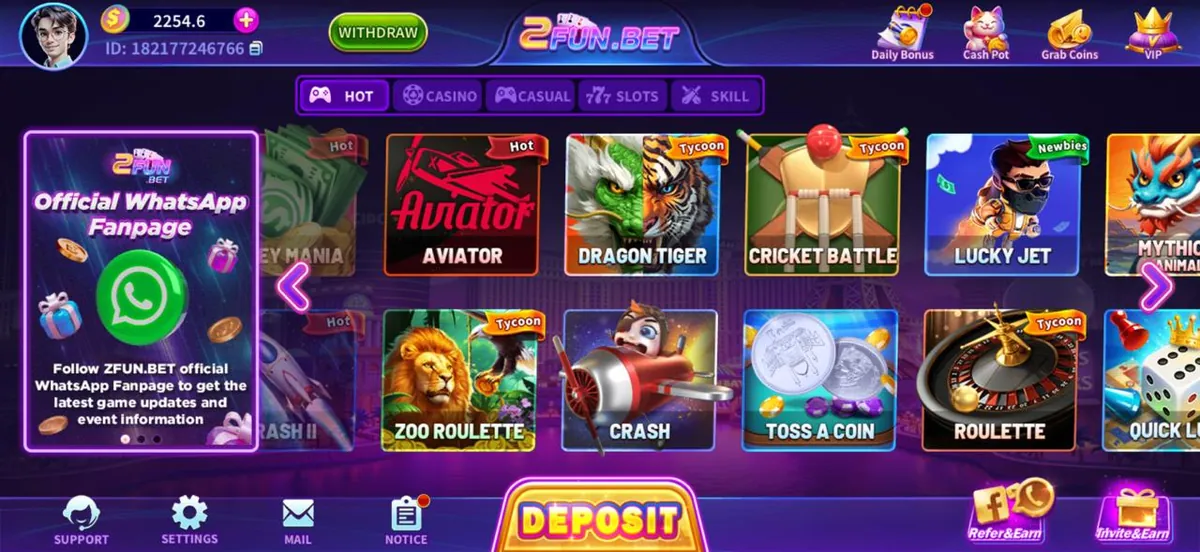
Step 4 – Understand the Lobby
Spend a minute tapping through the category tabs before you play anything. Knowing where Support and Settings live makes the rest of the experience much calmer.
| Area | What is there |
|---|---|
| Top-left | Avatar, player ID, balance |
| Top-centre | Withdraw button and brand logo |
| Top-right | Daily Bonus, Cash Pot, Grab Coins, VIP |
| Middle | Category tabs and game cards |
| Bottom bar | Support, Settings, Mail, Notice, Deposit, Refer & Invite |
Step 5 – Play Your First Round
Start with the smallest stake the title allows. The point of the first round is to learn the interface, not to chase a result, and the 2fun game lobby makes small rounds easy.
- Open the Casual or Hot tab.
- Tap a game card and wait for it to load.
- Read the on-screen rules panel before taking part.
- Play one short round to see how results are shown.
- Use the back arrow to return to the lobby.
Step 6 – Wallet and Rewards, If You Want Them
Deposit sits on the bottom bar and Withdraw at the top of the lobby. Both screens show the methods available to your account with the current limits, and both keep a history list you can use to raise an appeal.
The reward screens — daily bonus, Invite & Earn, Refer & Earn — cost nothing to use. Collecting the daily bonus and sharing your invite link with genuinely interested friends is the sensible way to build a balance without depositing more.
Pros
- Whole setup takes about five minutes
- Browser play needs no install at all
- Flat navigation that is easy to learn
- Wallet and support always one tap away
Cons
- Android install needs a security permission
- Landscape layout is cramped on very small screens
- Available titles change between updates
Good Habits From Day One
- Decide a spending limit before you deposit anything, and stick to it.
- Withdraw regularly instead of leaving a large balance in the app.
- Keep your password private — support will never ask for it.
- Log out on shared devices.
- Take breaks; the app is entertainment, not income. 18+ only.
Frequently Asked Questions
Q1.Do I need to install anything to follow this guide?
No. You can complete every step in a phone or desktop browser. Installing the Android package is optional and only matters if you want a home-screen icon and a full-screen lobby without browser bars.
Q2.How long does the setup take?
Around five minutes on a normal phone and connection: a minute or two for the download and install, under a minute to register, and the rest to look around the lobby before your first round.
Q3.Do I have to deposit to play?
You can register, explore the lobby and use the free reward screens without depositing. Adding funds is a separate decision you make on the deposit screen when and if you want to.
Q4.Which game should a beginner open first?
Start in the Casual or Hot tab. Casual titles have the simplest rules and the shortest rounds, and Hot shows what other players are opening, which saves you guessing from a long list.
Q5.What should I do if something goes wrong?
Use Support on the bottom bar and include your player ID plus a screenshot of the screen you are stuck on. For install or login trouble specifically, our install and login pages cover the exact error messages Android and the app show.
Conclusion
That is the whole 2Fun Bet path from zero: choose a route, optionally install, register, learn the lobby, play a small round, and only then think about the wallet.
Bookmark the FAQ page for quick answers, and the install page in case an update ever refuses to install.
Related Pages
2Fun Bet Editorial Team
Last reviewed: 16 September 2026